Preface
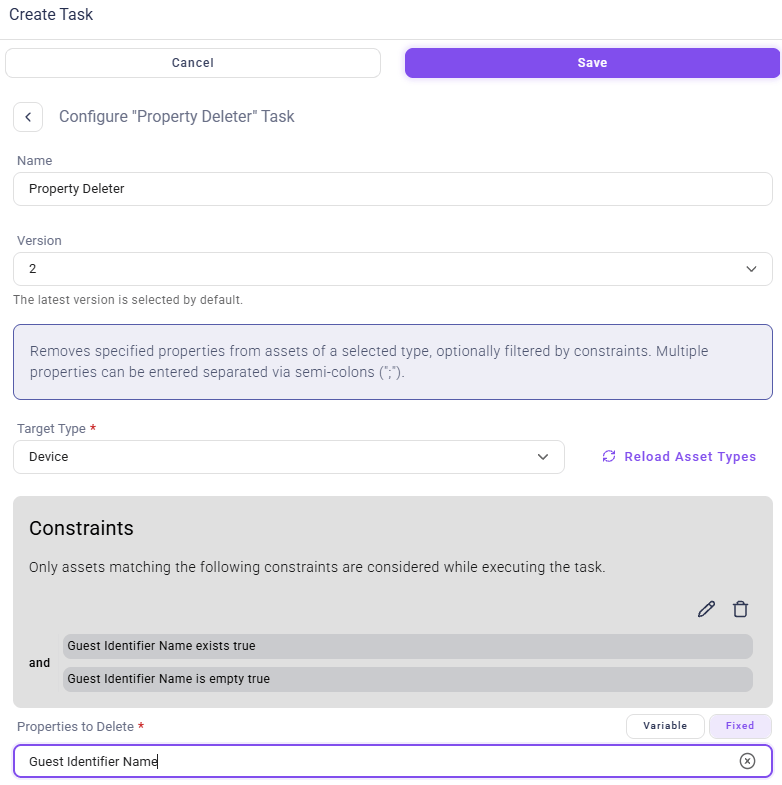
The “Property Deleter” in the “Data Consolidation” section automatically identifies and deletes redundant, inconsistent, or empty properties of an asset type. The Property Deleter checks if the defined properties exist for a specific asset type (the “target type”). Deletion only affects the data of the asset instances and does not alter the data schema in any way, so the property type included in the asset type continues to exist. The “Property Deleter” is especially useful when used after the Property Consolidator, which creates a unified property for all instances of an asset type. Afterwards, the “Property Deleter” is used to remove either redundant or inconsistent properties.Configuration
Select Parent Asset
Use the dropdown menu to select the asset type for which you want to remove the properties defined later. By default, the Deleter will check all asset instances.Define Constraints (optional)
You can define constraints to limit property deletion to specific asset instances. For instance, you can restrict deletion to assets that originated from a particular data source or that have not been seen in a certain amount of time.Define Properties for Deletion
Enter the names of all the properties to be processed, separating them with semicolons. For example, if there are deprecated or redundant properties reflecting an asset’s IP address, list them here to remove them. You can either type fixed values (text strings) for the names of the properties to be deleted or choose an existing value from your set of predefined Variables.