
Preface
Qbilon provides a read API, which allows for sophisticated filtering of domain data that shall be retrieved. The read API can query data from Qbilon using (potentially) complex conditional logic. For this purpose, the data endpoint/apiv1/data allows POST requests to be received.
Query Format
The Qbilon Read API supports complex queries of the domain data stored in your Qbilon instance. It uses a versatile query format in JSON that can be included in the body of a POST request to read data from Qbilon. The body consists of several optional parts and some mandatory basic parts. This allows a user to request exactly as much information as they need.Full-Fledged Query Format
A full-fledged example of the format for a complex query retrieving assets and relations from the backend could look like this:Types and Relations
The body of the query is divided into two parts, i.e.,types and relations. This allows you to retrieve them separately or in combination, e.g., if you only provide the types part then the result will also only contain types but no relations. Vice versa, if you skip the types part and only put the relations part into the request body, the API will return only the requested relations, but no types. Each part is designed as an array of query objects so that you can query multiple types/relations with one request.
Examples
types field. Within the elements field there will be all assets of that type with all their properties. There is some additional information provided, i.e., the property that is used as a name for instances of that type (in this case Name with the value example-resource-group ) as well as the qbilonId for this asset, which is a globally unique ID within Qbilon for this asset.
To retrieve relations, the process is very similar. If you want to retrieve all relations of a certain type, the request would look like this:
qbilonId for relations, you will also receive the sourceQbilonID and targetQbilonId, which are the unique IDs of the source and target assets from and to which this relation goes.
The ‘names’ Limiter
Both, types and relations, can have an optionalnames field which lets you restrict the type of assets/relations you want to retrieve from Qbilon.
Examples
If you only want to retrieve all assets of type Azure Resource Group instead of all assets, you can simply change your request from before to:
types field, i.e. Azure Resource Group with all its assets in the elements field, like this:
Azure Region and Azure Resource Group that is called contains, then you would have to provide the full relation name in the form contains [Azure Region -> Azure Resource Group] as shown in the following example:
contains [Azure Region -> Azure Resource Group], like this:
The ‘attributeNames’ Limiter
Sometimes you are not interested in the plethora of properties that Qbilon stores for each asset or relation and therefore want to limit what the API returns in this regard. To limit the properties returned to those that are useful to you, you can use theattributeNames limiter.
Examples
If you want the Azure Resource Group example above to be reduced to just the Name and ID properties, you can achieve this by modifying your request as follows:
attributeNames limiter can be freely chosen and do not have any cross-reactions with the attributes you used in your conditions.
The fields
nameAttribute and qbilonId are not properties of an asset, so they are always returned.Atomic Conditions
This condition can express simple conditions, such asnumber Of Cores <= 8, where number Of Cores is a numeric property in Qbilon.
Parameters are:
conditionTypeindicates that the condition is an atomic condition.attributeNameis the name of the property to evaluate in this condition.operatoris used during the evaluation and must fit the data type of the property.valueis the value to compare against.
Relation Conditions
This condition is only applicable to assets and is used to express a relational condition, for instancedevices with number of "monitored_by" edges > 10 or nodes with number of incoming and outgoing edges > 10. Please note that the actual number of relations found is not included in the result.
Parameters are:
conditionTypeindicates that the condition is a relational condition.operatoris used during the evaluation and must be an equality or numeric operator.countdetermines the number of distinct relations that each asset instance must satisfy (only positive integers or zero are allowed).- Either …
direction: one ofincoming,outgoing,bothindicating the direction of relations to consider (only allowed if norelationFullNameis specified)
relationFullName: name of relations to consider for counting. This must be syntactically correctsimpleName [sourceType → targetType](only allowed if nodirectionis specified).
relationFullName:
direction:
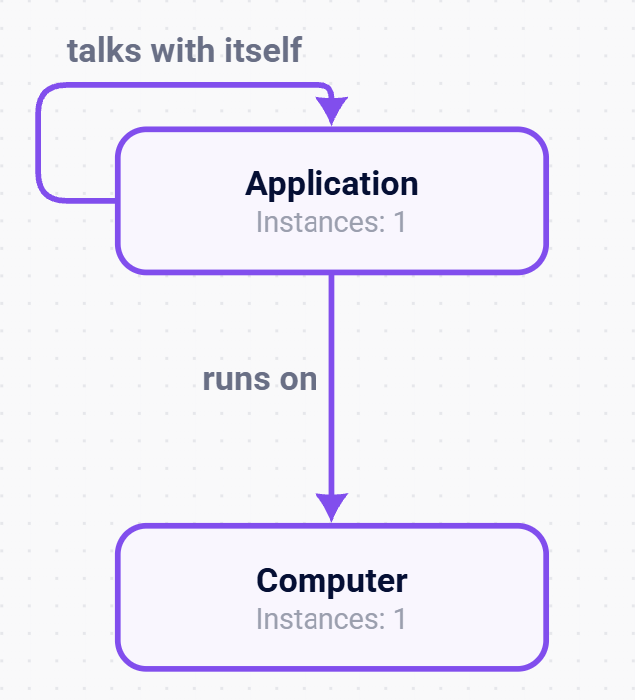
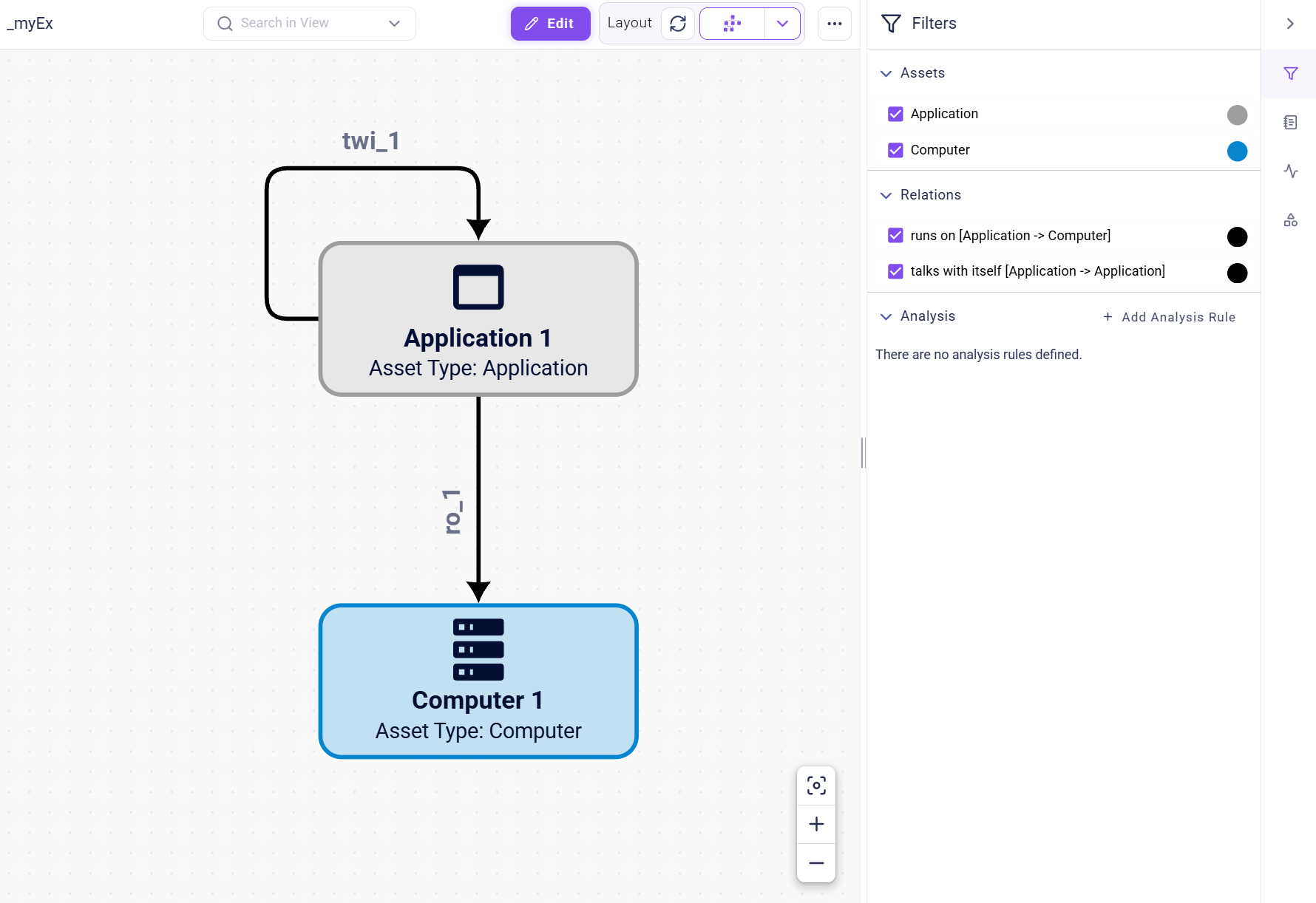
Application 1 has an incoming talks with itself relation, and Computer 1 has an incoming runs on relation.
Assets with one outgoing relation
Now, we want to retrieve all assets that have exactly one outgoing relation. To do so, we will modify our request slightly to include the following:
Application 1 has two outgoing relations: the talks with itself relation and the runs on relation. Computer 1 has no outgoing relations.
Assets with two relations
Now, we want to retrieve all assets with exactly two relations. It does not matter if they are incoming or outgoing. To do so, we will modify our request to include the following:
Application 1 is now regarded as an asset with two incoming and two outgoing relations, when its talks with itself relation was previously considered in the incoming and outgoing relations query as one relation each. Qbilon counts relations by their unique ID, which is why, in the case of both, it is counted only once. Therefore, Qbilon returns only Application 1, which has two relations: the talks with itself relation and the outgoing runs on relation. Computer 1 has only one incoming relation.
Nested Conditions
This condition is used to nest other conditions using a logical operator. This allows for the creation of complex conditions, e.g.numberCores >= 8 || number of incoming&outgoing edges < 10. The nesting depth is not limited.
Parameters are:
conditionTypeindicates that the condition is a nested condition.operatoris eitherandororindicating that either all or only one of the given conditions must be met.conditionis a list of conditions which have to be satisfied depending on the logical operator given (and/or). Nested conditions can contain any type of conditions which can again be nested themselves.
System Conditions
There are currently two additional condition types that cover cases where not a property or relation is being filtered, but system properties of assets and relations, such as the assets’ propertiesqbilonId and datasources (describing the origin of asset data).
QbilonIdCondition
This condition is used to check for Qbilon IDs, i.e., only assets are returned that have an ID contained in the provided list. The IDs are “Base64”-encoded. An error is thrown if any string in the list is not a valid Base64-encoded long integer. The list of IDs cannot hold duplicates. If an ID is not found, it is ignored.
Parameters are:
conditionTypeindicates that the condition is aQbilonIdCondition.idsList of strings must hold unique, Base64-encoded long integer values.
System data source as basis. The Manual data source only occurs when a user manually creates from scratch or modifies an asset, an asset’s property or the property values.
Parameters are:
conditionTypeindicates that the condition is aDataSourceNameCondition.valuesSet of string holds the names of data sources to check for, if an asset holds any of the listed data sources, it is considered relevant for the result
Condition Operators
Condition operators are used to evaluate atomic or relation conditions. They process two values, i.e. the value of the property/relation count (hereafter calledpval) and the condition value (hereafter called cval). As a result, they return true or false.
Nesting limitation
Although in theory nesting can be infinite for the following operators in reality Qbilon only allows filter to a nesting depth of 2 levels.Datatype-Specific and -Unspecific Operators
There are two categories of operators, i.e., datatype-specific and -unspecific ones, where equality and existence are datatype-unspecific and the rest are datatype-specific ones. That means that equality and existence operators can be used with properties of all datatypes, whereas the others only can be used with properties of their specific datatype, e.g., numeric only with numbers or temporal only with datetimes.Equality
equal_to: True ifpvalandcvalare equal.- Example: an asset has the property
Namewith valueGermany. When the following condition is processed on this asset, it will returntrue.
- Example: an asset has the property
not_equal_to: True ifpvalandcvalare not equal.- Example: an asset has the property
Namewith valueGermany.When the following condition is processed on this asset, it will returntrue(as “Germany” != “France”).
- Example: an asset has the property
Existence
exist:- True, if
pvalexists andcvalis true. Example: an asset has the propertyNamewith any value. When the following condition is processed on this asset, it will returntrue.
- True, if
- False, if
pvalexists andcvalis false. Example: an asset has the propertyNamewith any value. When the following condition is processed on this asset, it will returnfalse. - True, if
pvaldoes not exist andcvalis false. Example: an asset does not have the propertyName. When the following condition is processed on this asset, it will returntrue. - False, if
pvaldoes not exist andcvalis true. Example: an asset does not have the propertyName. When the following condition is processed on this asset, it will returnfalse.
Numeric
less_than: True ifpvalis smaller thancval.
Age with the value 25 . When the following condition is processed for this asset, it will return true.
greater_than: True ifpvalis greater thancval.
Age with the value 25 . When the following condition is processed for this asset, it will return true.
less_than_or_equal: True ifpvalis smaller thancvalor equal to it.
Age with the value 25 . When the following condition is processed for this asset, it will return true.
greater_than_or_equal: True ifpvalis greater thancvalor equal to it.
Age with the value 25 . When the following condition is processed for this asset, it will return true.
String
contains: True ifpvalcontainscvalas substring. Be aware that this operator is case sensitive!
Name with the value Germany . When the following condition is processed for this asset, it will return true.
contains_not: True ifpvaldoes not containcvalas substring. Be aware that this operator is case sensitive!
Name with the value Germany . When the following condition is processed for this asset, it will return false.
matches: True ifpvalmatches the valid regex patterncval(see this website for information on regular expressions).
Name with the value Germany . When the following condition is processed for this asset, it will return true.
matches_not: True ifpvaldoes not match the valid regex patterncval(see this website for information on regular expressions).
Name with the value Germany . When the following condition is processed for this asset, it will return false.
List
contains_element: True ifpvalis a list and contains an assetcval. This only works for lists with text values.
Names with the value [Germany, France] . When the following condition is processed for this asset, it will return true.
contains_not_element: True, ifpvalis a list and does not contain a stringcval. This only works for lists with text values.
Names with the value [Germany, France] . When the following condition is processed for this asset, it will return false.
contains_element_with: True ifpvalis a list and contains an asset containing substringcval.
Names with the value [Germany, France] . When the following condition is processed for this asset, it will return true.
contains_element_not_with: True, ifpvalis a list and does not contain a string containing a substringcval.
Names with the value [Germany, France] . When the following condition is processed for this asset, it will return false.
Temporal
Remember that all times in Qbilon are in UTC, so they might differ from your local time depending where you are currently located.
- filtering for a relative period (relative to now), e.g,. 5 days in the past from now
- filtering for something that is before or after a specific point in time, e.g., something before 2025-10-10 00:00:00
within: True ifpvalis a datetime and is within the period stated bycval. For the period format see “Format” subsection below.not_within: True ifpvalis a datetime and is not within the period stated bycval. For the period format see “Format” subsection below.
cval must be given in the following format or there will be an error message:
- Starting with
Por-Pindicating a time period in the future or past <integer>Y= amount of years<integer>M= amount of months<integer>W= amount of weeks<integer>D= amount of daysTindicating the time part of the period<integer>H= amount of hours<integer>M= amount of minutes<integer>S= amount of secondsP/-PandTare both mandatory whereas all other parts are optional.
Last Seen with the value 2025-04-09T12:30:22 and now equals 2025-04-10T12:30:22
- When the following condition is processed for this asset, it will return
true, aspvallies within the period of 2 years, 3 weeks, 3 hours, 1 minute and 9 seconds in the past relative to now.
- When the following condition is processed for this asset, it will return
true, aspvaldoes not lie within the period of 1 hours in the past relative to now.
- When the following condition is processed for this asset, it will return
true, aspvallies within the period of 1 day in the past relative to now (first we go 2 days in the past and by negating the hours part in the period we add 24 hours again, resulting in 1 day)
- When the following condition is processed for this asset, it will return
false, as pval does not lie within the period of 10 days and 10 seconds in the future relative to now.
before: True ifpvalis a datetime and is beforecval. For the time format see “Format” subsection below.after: True ifpvalis a datetime and is aftercval. For the time format see “Format” subsection below.
cval must be given in the following format or the condition will be ignored: YYYY-MM-DDTHH:MM:SS.
➥ Examples
All of the following examples assume that there is an asset that has a property Last Seen with the value 2025-04-09T12:30:22.
- When the following condition is processed for this asset, it will return
true, aspvallies beforecval.
- When the following condition is processed for this asset, it will return
false, aspvaldoes not lie beforecval.
- When the following condition is processed for this asset, it will return
true, aspvallies aftercval.
- When the following condition is processed for this asset, it will return
false, aspvaldoes not lie aftercval.
Pagination and Sorting
From version 3.16 onwards, the Qbilon Read API supports pagination and sorting. These options allow you to retrieve a limited number of assets or relations at a time and control their order. The optional fieldslimit, offset and orderBy are part of each query object within the types or relations array. They are included in the JSON body of the POST /apiv1/data request, not as URL parameters.
The ‘limit’ and ‘offset’ Limiters
limitis the maximum number of matching elements to return. Only positive integers are allowed. If omitted, no explicit limit is applied.offsetis the number of matching elements to skip before returning results. Only positive integers or zero are allowed. If omitted, no elements are skipped. Conditions are evaluated before pagination. If fewer elements remain than the requestedlimit, the API returns only those elements.
Azure Resource Group, use:
"offset": 100. For the third page, use "offset": 200, and so on. Keep the names, attributeNames, conditions and sorting unchanged between requests.
The response has the same structure as a query without pagination. The returned assets are found under types → Azure Resource Group → elements. There is no separate page number or total-count field.
Without an explicit
orderBy, elements are ordered by their internal element ID.Sorting with ‘orderBy’
The optionalorderBy field specifies the properties by which the result is sorted. It is an object whose keys are property names and whose values specify the sorting direction:
ascsorts in ascending order.descsorts in descending order. Numeric properties are sorted numerically, and date-time properties are sorted chronologically. Elements without a value for the sorting property are placed last. The internal element ID is used as a final tie-breaker.
Name in ascending order:
"asc" with "desc".
Pagination and Sorting for Relations
The same options work for relations. Provide the full relation name innames, as in other relation queries.
Example
offset to 50.
Reading All Pages
To read a complete result in pages:- Choose a positive
limitand start withoffsetset to0. - Send the query and process the returned elements.
- Increase
offsetbylimitand repeat the same query. - Stop when a page contains fewer elements than
limit. If the last full page contains exactlylimitelements, the following request returns an empty page.
Error Handling
Format Violations
The API will throw an exception if the incoming payload (that constitutes the query) is invalid or unexpected in any way.Inconsistent Input
Additional Condition Examples
Retrieving Assets
- All assets of type
Azure Resource Group…- with at least 5 outgoing relations of type
containsAND Provisioning Statematching regex[a-zA-Z]+(containing only characters between a-z or A-Z, at least one),- extracting properties
Name,IDandProvisioning State.
- with at least 5 outgoing relations of type
Please note:
- Within the relation constraint,
relationFullNameonly applies to the specified relation (which is unique within Qbilon). conditionTypefields are required to distinguish between the different types of constraints.directionis not allowed as we want to apply the condition to all relationscontains [A -> B].
Retrieving Relations
- All relations of type
has attached [A → B]…- with a value for the property
Namethat does not match the Regex[a-zA-Z]+and - the relation condition is ignored, since it’s not applicable to “relations”.
- with a value for the property
Please note:
namesare listing relation full names to consider for queryingconditionTypefields are required to distinguish between the different types of constraints
Retrieving All Assets With Condition
Type names or relation names are not required when querying data with this API, allowing for more powerful (and computationally intense) requests, such as:names field leads to applying the conditions to all assets in Qbilon.
Retrieving All Properties
TheattributeNames property in the input is not required, but the attributeName in the condition is mandatory. If attributeNames is omitted or empty, all properties are retrieved for each matching instance.
AWS Region that meet the temporal range condition are retrieved together with all of their properties.