
Preface
In Qbilon, merging is one way to consolidate data. It automatically combines assets from two or more distinct data sources based on each asset’s properties into one new asset. For example, this can be useful for bringing together information about the same physical asset from two different data sources, such as infrastructure information from a “hyperscaler” and license information from a license management system. The/apiv1/data/merge/{taskId} endpoint enables programmatic merging of data in Qbilon. Currently, this endpoint is in the “beta stage,” meaning you can use it, but the data format may change in the future.
Merging Concept
To better understand this endpoint, we will first explain how merging works from the user’s perspective. Then, we will explain the data format that can be used with this endpoint to control how Qbilon merges the data. So how does merging work in Qbilon? Consider the case shown in the first figure below. You have loadedComputer assets from one data source and License assets from another. As you can see in the figure, both are currently not connected.
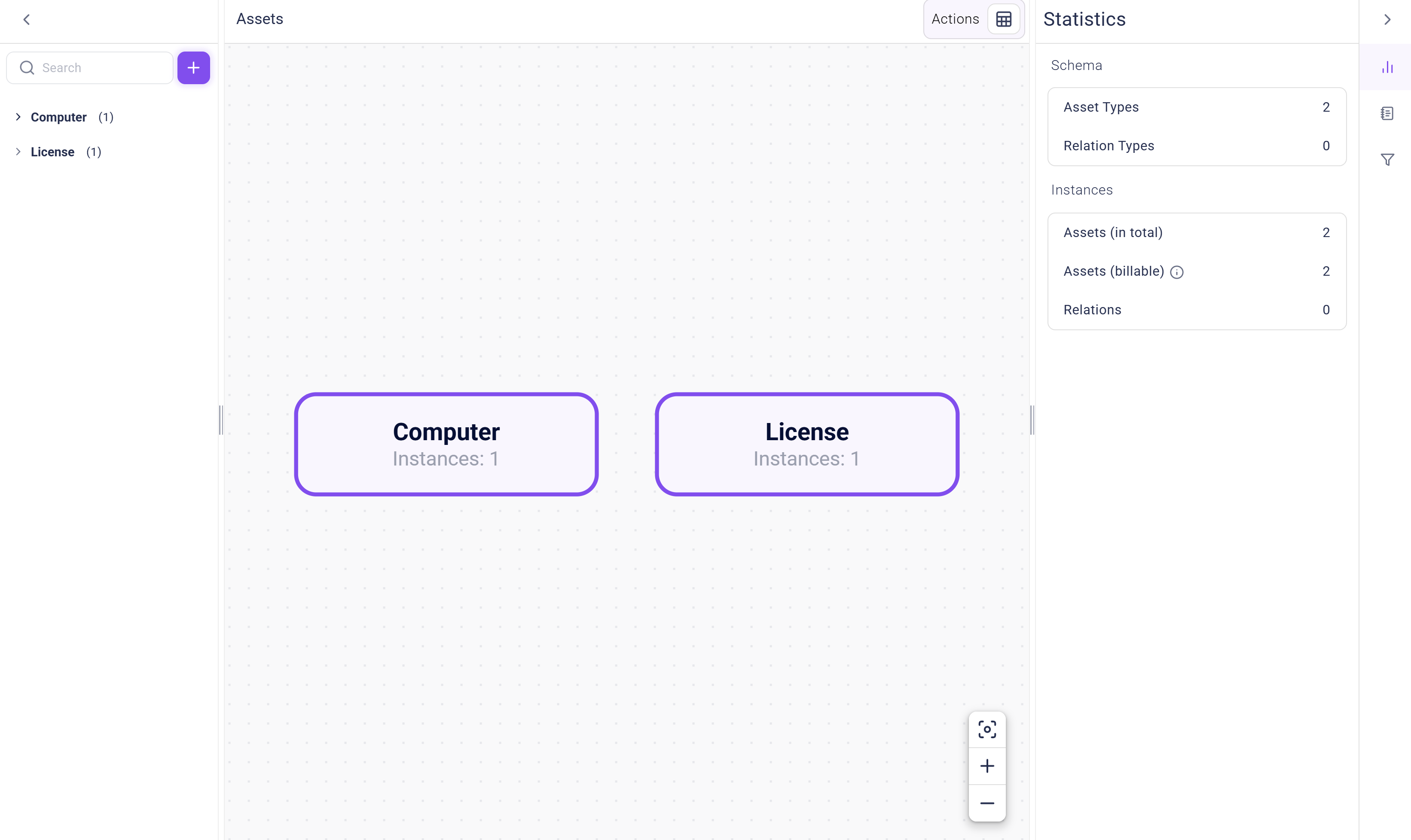
Computer where the OS Product Key used for OS activation is the same as the License Key in a License asset. To automatically merge these types, you can create a Custom Merger task in Qbilon like this:
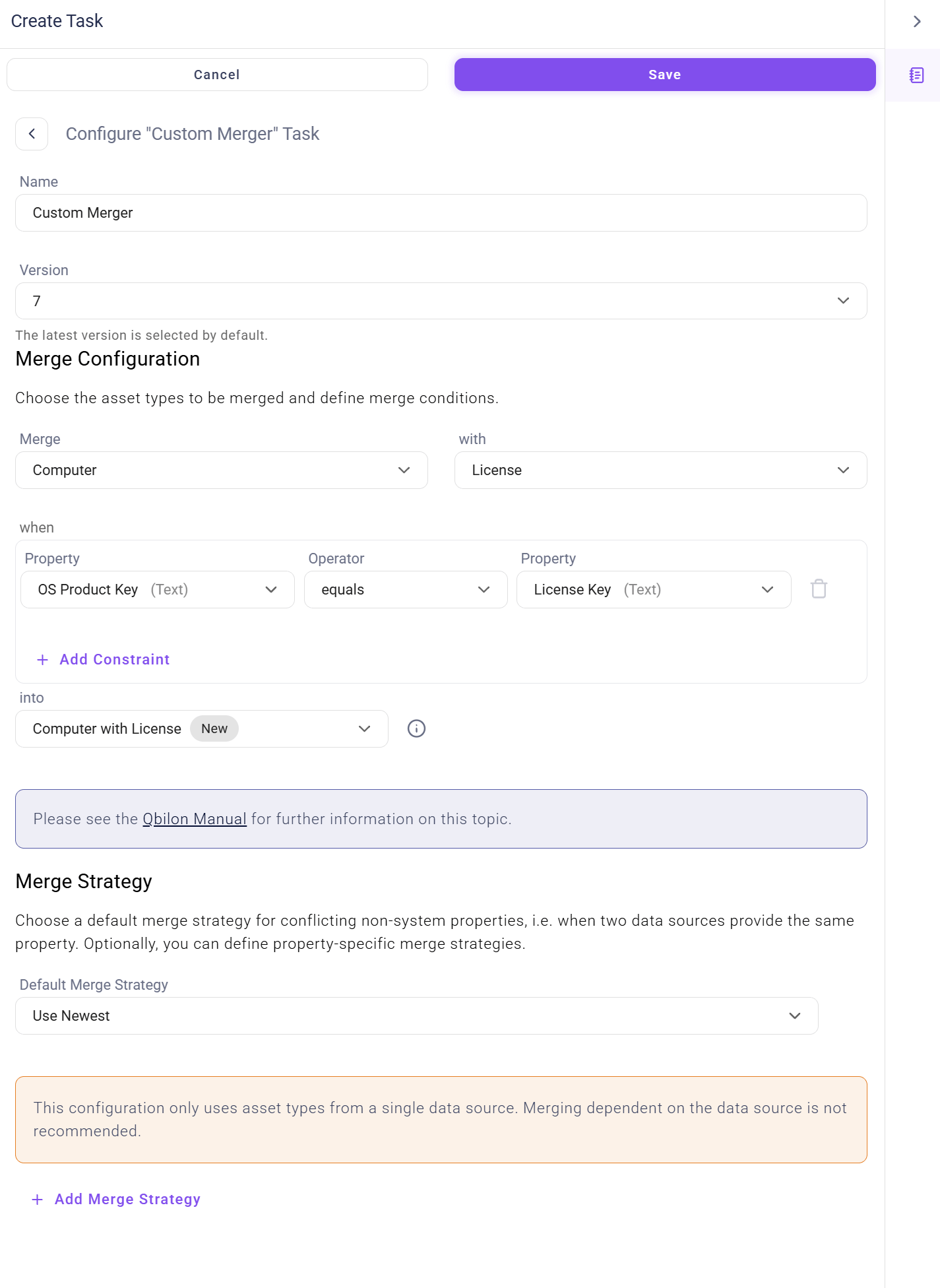
Computer and Licenses instances when the OS Product Key property value of a Computer matches the License Key property value of a License. If Qbilon finds a combination of assets that matches this merging condition, you also defined that the merged asset should have a new type, Computer with License, and that the Name property should be used for the display Name.
However, you knew that Name would probably be present in both assets, so there should be a rule clarifying which value should be used for the newly created asset. To accomplish this, you first created a “Default Merge Strategy” that specifies that, whenever there are conflicting properties, the newest value should be used. Qbilon keeps track of when each property was last written.
For the Name property, however, you want the special behavior where the name from the “Asset Management Tool” is used (if present), and then Qbilon falls back to the name from the “License Management Tool”.
Fortunately, the existing data contains perfectly matching values for the OS Product Key and License Key. After running the merger task for the first time, the “Licensing” view and data schema will change as follows:
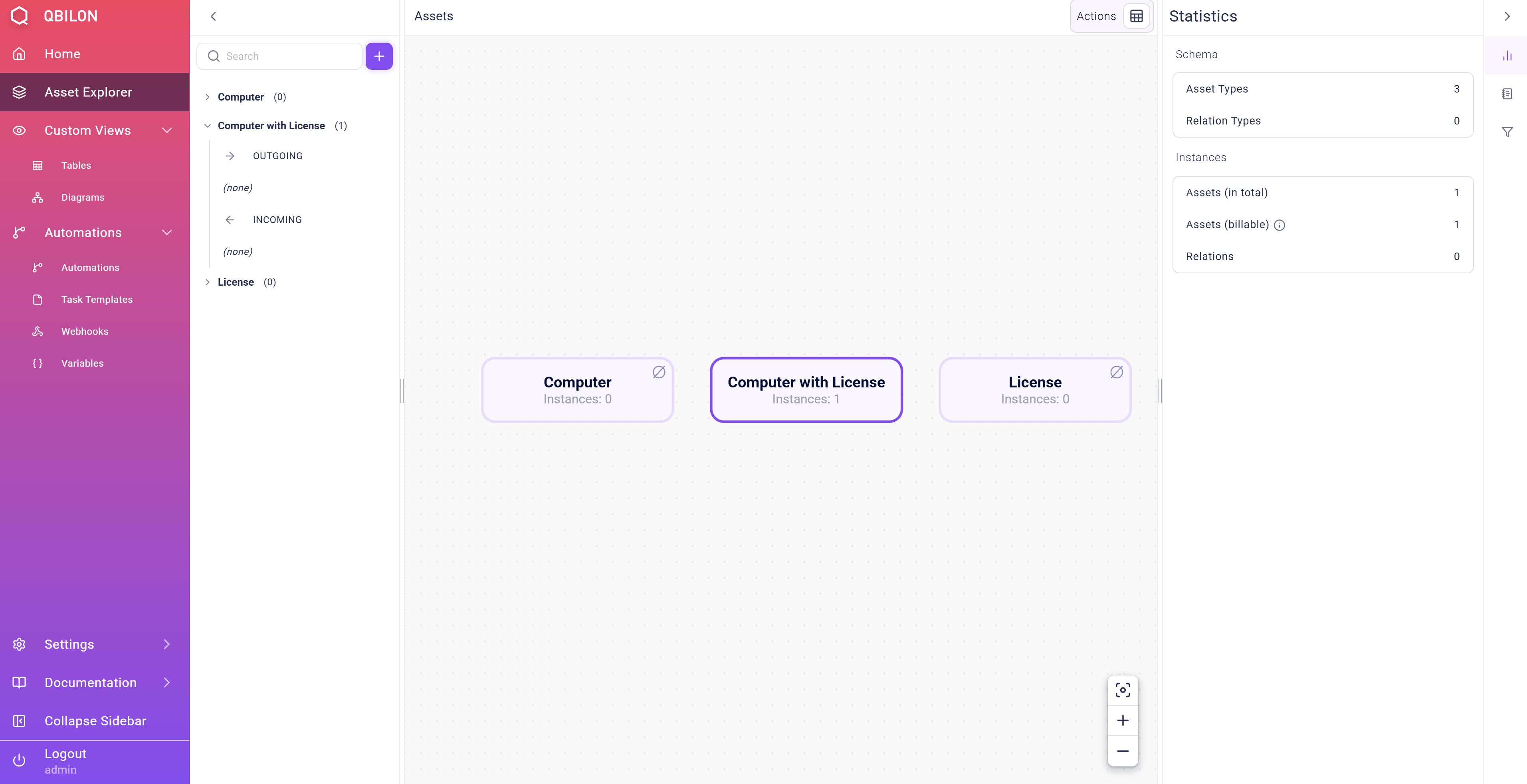
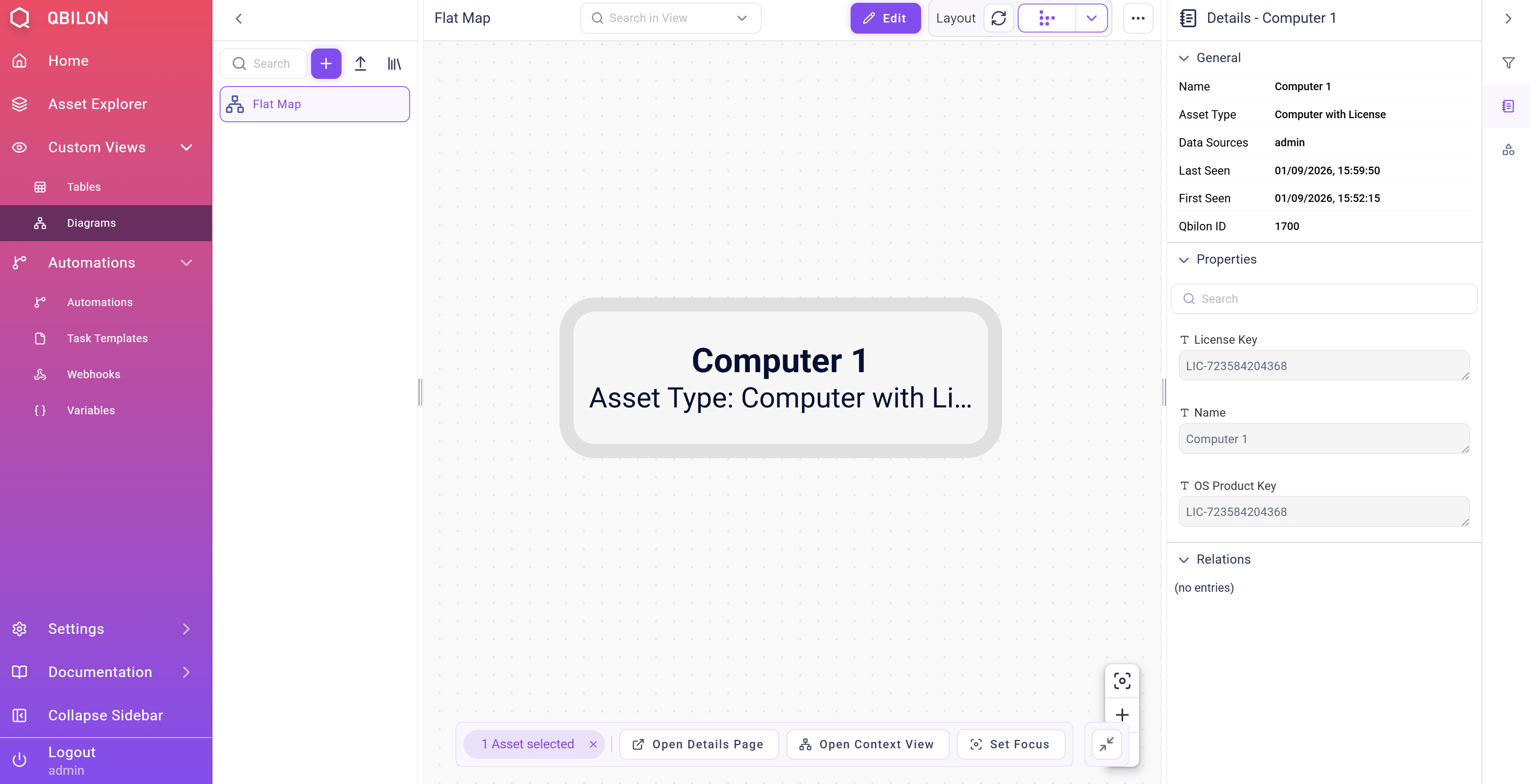
Computer and License assets into one new Computer with License asset, which contains all properties from both original assets. The Name property was successfully transferred from the asset originating from the “Asset Management Tool”.
This is how merging works from the user’s perspective. With the Merging API, you can now programmatically trigger the same behavior by sending the necessary merging information as JSON, rather than creating it manually in the UI.
To use the merge endpoint, two conditions must be met:
- A prepared data source (see the respective section in Rest API) in whose name merge requests are sent to Qbilon (this is the
{taskId}part in the URL), and - Compliance with the data format as defined in Qbilon’s OpenAPI specification is also required (see
<your qbilon host>/openapi/index.html).
Data Format
The full version of the JSON format for a merging action, as described above, would look like this:POST apiv1/data/merge/-2 with valid credentials, then all instances of Computer will be merged with instances of License if the value of the respective Computer/OS Product Key property is equal to the value of the License/License Key property.
The following step-by-step walkthrough of the merging configuration will help you better understand each part and the expected merging result.
Field “mergeConditions”
ThemergeConditions field contains a list of comparison conditions and a booleanOperator that specifies how the conditions should be evaluated.
All comparing conditions in the conditions array must be in the following form:
attr1/attr2 fields should refer to an existing attribute of the types being compared. If the attribute does not exist, the condition is evaluated as false. The datatype of each attribute must be one of those allowed in Qbilon: Boolean, Text, Number , DateTime or List<Boolean|Text|Number|DateTime>.
The allowed operators depend on the combination of datatypes of the attributes used for the comparison:
The last field
conditionDiscriminator is mandatory and must be simpledoubleattributecondition. This may change in a later version of the data format.
Field “targetTypeName”
ThetargetTypeName field defines the type of the merged assets. If the merger detects two assets that should be merged according to the mergeConditions, the targetTypeName is the type of the resulting asset. If a type with the given name already exists in Qbilon, only the asset is created, not a new type. If no such type exists, the merger first creates the type and then creates the asset.
Field “nameAttributes”
ThenameAttributes field specifies which attribute of the newly merged asset will be used as the asset’s display name, i.e., which property will be used for the name in a diagram or table view.
The field expects a list of attribute names and their priorities. If the attribute with priority “0” is not present for either of the two merged assets, then the attribute with priority “1” will be used instead.
Although the list can be empty, it is recommended that you provide at least one attribute name in the following form:
Field “defaultMergeStrategy”
The fielddefaultMergeStrategy is used to define how Qbilon should handle properties that are present in both assets to be merged. For example, the property Name can be found in several asset types.
To specify which value Qbilon should use in such cases, you can provide a merge strategy that describes it. Currently, Qbilon supports three different merge strategies out of the box.
- Always take the newest value.
- Always take the oldest value.
- Take the value depending on where it comes from.
newest strategy, set the defaultMergeStrategy to the following value:
oldest strategy, set the defaultMergeStrategy to the following value:
datasourceDependentMergeStrategy, set the defaultMergeStrategy to the following value:
Merging Behavior in Practice
The following will cover several real-life cases and general topics that users of the Merge API may encounter. We will examine how the Merge API behaves in these cases to help you better understand the expected results of a custom linker.Difference “Merge API” vs. “Read/Write/Delete API”
Could the read/write/delete API of Qbilon in a custom task be used to achieve the same? Generally, you can achieve a similar result by first reading the data from Qbilon, deleting assets and relations that should be removed, and finally writing back assets and relations that contain the merged information. However, compared to using the Merge API, this implementation would have two major drawbacks:- Newly written data source replaces old data sources. This means that an asset or relation, along with all its properties, may have originated from data source 1. However, if you manually enter the same data using your own custom task, the information that the data originally came from Data Source 1 will be lost. Instead, the assets will appear in Qbilon as if they were written by your custom task.
- Updates from the original data sources will not be applied. This means that if an asset was originally written by data source 1 and then merged with an asset from data source 2, it will receive updates from both data sources if the merge is done through the merge API. However, it will not receive those updates if the data is rewritten through a custom task.
Repeated Run of Original Data Sources
After merging two assets into one, it is fed updates from two data sources. In the case of several consecutive merges, it is fed updates from even more data sources. During the original merge, you can define the behavior for conflicting properties. However, this will not be applied during updates run by each data source. For example, if the update strategy for a write is set toUPDATE_ALWAYS, the newest value provided by that data source will be applied to the property values of the merged asset whenever that data source runs.
Note that, in rare cases, this could lead to a yo-yo effect, where the value of a property fluctuates between the two values provided by different data sources.