
Preface
The main purpose of the Qbilon Sink is to receive data in the Qbilon graph format (see Writing in Qbilon) via Webhook Trigger and directly write it to the Qbilon database. This means it is a utility data source that is typically used in two scenarios:- You created an external script to send data to Qbilon, and you want that data written to the database.
- You are using one of the External Connectors delivered by Qbilon that use this mechanism to import data from systems that cannot be accessed from the main Qbilon application.
Overview
To use the Qbilon Sink for one of the above scenarios, you do not need to configure anything in the task settings directly. Only the task name can be edited here. However, you must set up a Webhook Trigger beforehand and configure the Qbilon Sink to be triggered by this webhook. A Qbilon Sink with a different trigger type (e.g., scheduled) will not fail but also will not do anything because there is no data to process. For example, a step-by-step guide to setting up a working Qbilon Sink would be as follows:- Create a new standard webhook trigger as described in Webhook Trigger. Let’s call it the “Bruno Trigger,” since we will later send data to it via the Bruno REST Client.
-
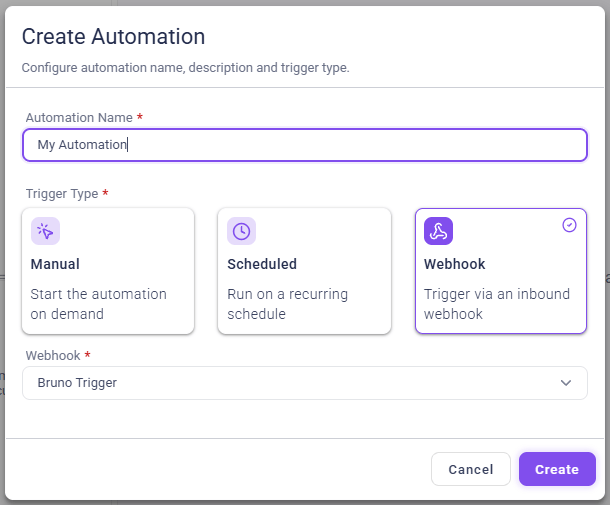
Create a new automation in the “Automations” section with a Qbilon Sink as the first task. In the “Execution Settings” of your Qbilon Sink, select “Bruno Trigger” as follows:
- In Bruno, create a new POST request to your webhook trigger, as described in Webhook Trigger. For the data, send the shorthand data format example from Writing in Qbilon.
- The webhook will then trigger your automation, starting with the Qbilon Sink. The Qbilon Sink will attempt to write the two nodes and one relation from the example data directly to Qbilon, as seen in the Qbilon Sink logs.